Connect Audionotes with Notion

You can seamlessly send all your notes from Audionotes to Notion

How to Connect Audionotes with Notion

How to Connect Audionotes with Notion

Log in to Audionotes

  • Open Audionotes Web and log in to your account.

  • From the left sidebar, go to Integrations.

  • Click Connect on the Notion integration card.

Follow the steps below to duplicate the Audionotes Notion template

Each new note you create will automatically send the following fields to your duplicated template: Title, Transcript, AI Notes, Created At, Note Type, Speaker Transcript

Step 1: Duplicate Our Notion Template

Step 1: Duplicate Our Notion Template

First, you'll need to duplicate our pre-built Notion template to your workspace . Click Connect on the Notion integration card.

Duplicate Notion template step showing copy button on Notion page

Step 2: Authenticate Your Notion Account

Step 2: Authenticate Your Notion Account

Authenticate the duplicated template so that we can send you your notes to Notion. The below window will open. Click on ‘Select pages’. Choose the duplicated template and then click on Allow access to verify.
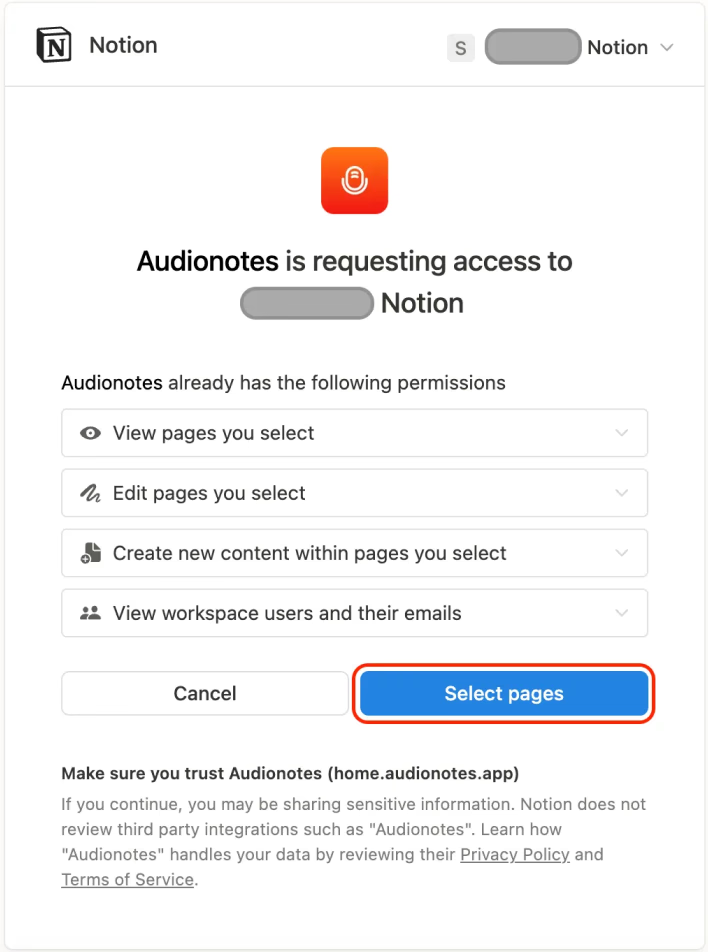
Notion authentication flow selecting pages and allowing access for Audionotes

Step 3: Link Your Template

Step 3: Link Your Template

Copy the duplicated notion URL. Paste the URL in the above input box and click on ‘Connect’.

Copying Notion template link to connect it with Audionotes

We’re Here to Help

We’re Here to Help

Explore FAQs, guides, and integrations, all designed to keep you supported every step.

Plans & Pricing

Plans & Pricing

Choose a plan based on your requirements. Audionotes is for everyone.

Monthly

Annual

Upto 35% off

Pro

$129.99

/year

Advanced access to boost productivity.

Save upto 35%

What’s Included

Unlimited Voice Notes

Unlimited File Uploads

Unlimited Text Notes

Unlimited Notes from YouTube Video

Notion and Zapier Integrations

Mind Maps

Chat with Notes

Notes from Images

WhatsApp Bot

Recording size and file size limits may apply owing to device limitations and fair usage policy

Monthly

Annual

Upto 35% off

Pro

$129.99

/year

Advanced access to boost productivity.

Save upto 35%

What’s Included

Unlimited Voice Notes

Unlimited File Uploads

Unlimited Text Notes

Unlimited Notes from YouTube Video

Notion and Zapier Integrations

Mind Maps

Chat with Notes

Notes from Images

WhatsApp Bot

Recording size and file size limits may apply owing to device limitations and fair usage policy

Monthly

Annual

Upto 35% off

Pro

$129.99

/year

Advanced access to boost productivity.

Save upto 35%

What’s Included

Unlimited Voice Notes

Unlimited File Uploads

Unlimited Text Notes

Unlimited Notes from YouTube Video

Notion and Zapier Integrations

Mind Maps

Chat with Notes

Notes from Images

WhatsApp Bot

Recording size and file size limits may apply owing to device limitations and fair usage policy

Need a custom solution?

Need a custom solution?

Get in touch with our team to learn more.

Get in touch with our team to learn more.

Get In Touch

Learn How to Take Smarter Notes

Learn How to Take Smarter Notes

Explore blogs, guides, tips, and real use cases on AI note-taking, productivity, and getting more value from every note with Audionotes.
Explore blogs, guides, tips, and real use cases on AI note-taking, productivity, and getting more value from every note with Audionotes.

View All

Frequently Asked Questions

Frequently Asked Questions

Will changes made after creating the note reflect in Notion?

No. Once a note is sent to Notion, it won’t update automatically if you edit it later in Audionotes. Any changes will only be visible inside Audionotes.

Why am I not able to see my notes in Notion?

Please disconnect and reconnect your Notion integration. Make sure you are connecting the correct duplicated template.

Can I change the template structure?

We don’t recommend modifying the template’s structure, as it may cause issues with receiving data correctly.

Will I receive all my notes in Notion?

Yes. When you connect Notion, all your existing notes along with any new notes will automatically appear in your Notion workspace.

Can I make edits to my notes in Notion?

Yes, you can edit notes directly in Notion. However, those edits will not sync back to Audionotes.

Get the Audionotes app today

Get the Audionotes app today

Get the Audionotes app today

Still not sure that Audionotes.app is right for you?

Let ChatGPT, Claude, or Perplexity help you to choose.
Click a button and see what your favourite AI says about Audionotes.app.